Skip to content

Google Apps Script editor extension

Find Apps Script mistakes before you run them.

myFunction adds loop-batching checks, value validation for literal strings, project-wide diagnostics, and quick fixes to the Apps Script editor. Try a free 10-minute diagnostic session without an account, or sign in for five sessions each month. myFunction Pro includes unlimited diagnostics at $5.99/month. Quick fixes never save or run your code. You choose whether to apply each change.

Captured in Apps Script Problems panel
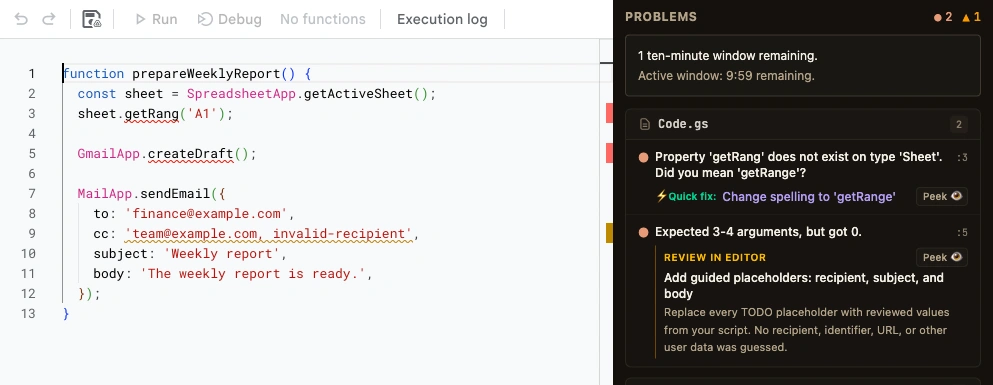
myFunction Problems panel beside the Apps Script editor, with errors grouped by file and targeted quick fixes
Your code and its diagnostics, together Open the Problems panel in the Apps Script editor to review errors, warnings, and available fixes.

Side by side

The editor, before and after.

The same code, captured with myFunction turned off and on. These examples show checks for repeated spreadsheet reads, malformed recipient values, and symbol autocomplete. No script was run.

Spot a cell-by-cell read loop

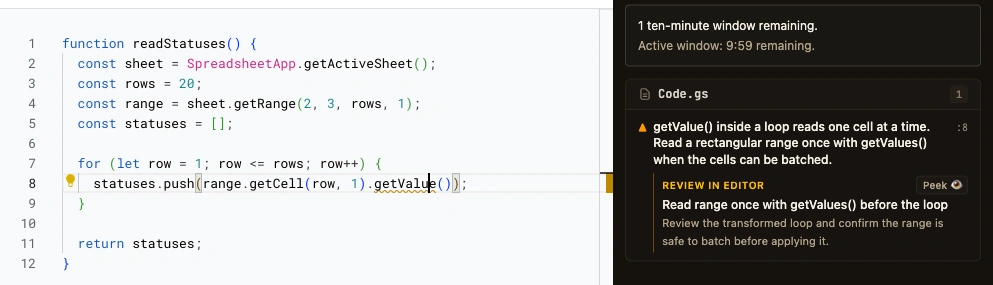
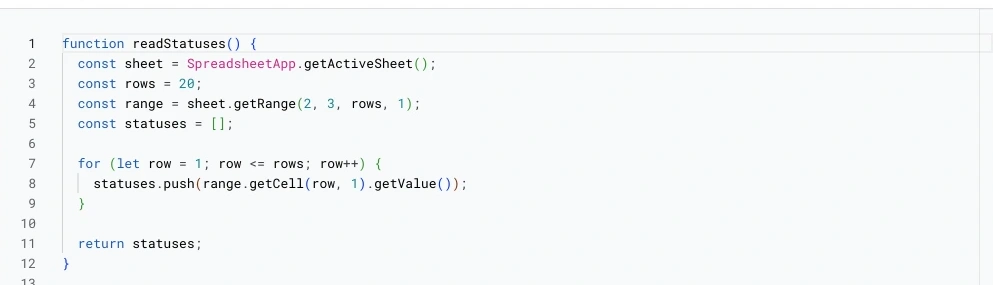
The same range is read one cell at a time inside a loop.

range.getCell(row, 1).getValue()
Native Apps Script Same code · Extension off
Native Apps Script editor showing a getValue loop with no warning
No loop warning The native editor displays this loop without a performance diagnostic.
With myFunction Performance check · MF90001
myFunction warns about repeated getValue calls and offers a batched getValues read
A warning and a batching suggestion myFunction flags the repeated reads and offers a fix to read the range once with getValues(). Review the change before applying it.

Diagnostic quick fixes

A diagnostic, then a fix you apply.

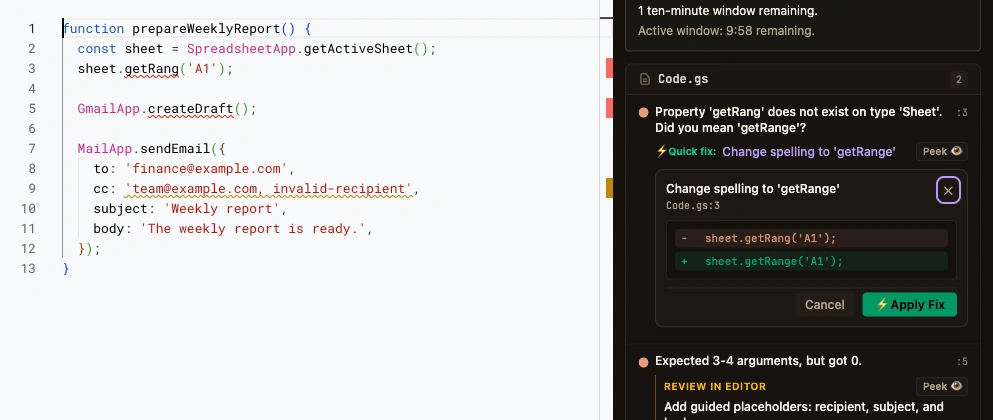
A misspelled method can stop a script at runtime. myFunction reports it while you edit and offers a targeted correction. Open the preview to compare the original code with the proposed change.

Quick fixes change the text in your editor. Saving, running, testing, and deploying stay with you.

Captured in Apps Script Quick-fix preview
myFunction quick-fix preview comparing a misspelled service method with its proposed correction
Review the change, then apply it The preview shows the proposed change. Apply the fix, or close the preview to keep editing.

Inside the editor

The IDE layer Apps Script leaves out.

Native Apps Script provides basic autocomplete and tooltips. It does not warn about loops that risk execution timeouts, malformed literal parameters, or broken cross-file references. myFunction adds those checks.

Execution quota & loop batching

Flags repetitive service calls (getValue, setValue, flush, UrlFetchApp) inside loops. Offers a quick fix that batches supported reads into one getValues() call, which helps keep scripts under the 6-minute execution limit.

Domain value validation

Checks literal string values as you edit and flags malformed email recipient lists, invalid regexes, and bad enum values before your script runs.

Cross-file project diagnostics

Apps Script files share a global namespace. myFunction indexes the .gs files in the project to catch broken cross-file calls and duplicate definitions.

Type inference from usage

Untyped JavaScript functions leave parameters as any. myFunction inspects call sites across the files in the project and offers a quick fix that generates JSDoc from them.

Runtime-faithful Google types

Emitted directly from live Apps Script environments, covering SpreadsheetApp, GmailApp, DriveApp, and all 31 Advanced Google Services.

Errors as you type

Catches misspelled methods, missing arguments, and invalid parameter shapes as you type, and offers quick fixes where a correction is known.

Types for SpreadsheetApp, GmailApp, CalendarApp, and all 31 advanced Google services are generated from live Apps Script runtimes.
Execution quota & timeout protection

Read the range once, then loop over the values.

Reading cells one at a time makes repeated service calls. For a loop like this one, myFunction can propose reading the range once with getValues() and using the returned array.

The preview below matches the batching fix offered for the captured loop (MF90001). Review the proposed code before applying it.

Read the loop-batching diagnostic guide

Repeated remote call · code 90001
function readStatuses() {
  const sheet = SpreadsheetApp.getActiveSheet();
  const rows = 20;
  const range = sheet.getRange(2, 3, rows, 1);
  const statuses = [];

  for (let row = 1; row <= rows; row++) {
    statuses.push(range.getCell(row, 1).getValue());
  }

  return statuses;
}
Proposed batching fix
function readStatuses() {
  const sheet = SpreadsheetApp.getActiveSheet();
  const rows = 20;
  const range = sheet.getRange(2, 3, rows, 1);
  const statuses = [];

  const myFunctionValues = range.getValues();
  for (let row = 1; row <= rows; row++) {
    statuses.push(myFunctionValues[row - 1][0]);
  }

  return statuses;
}

Value-level validation

A string can still be the wrong value.

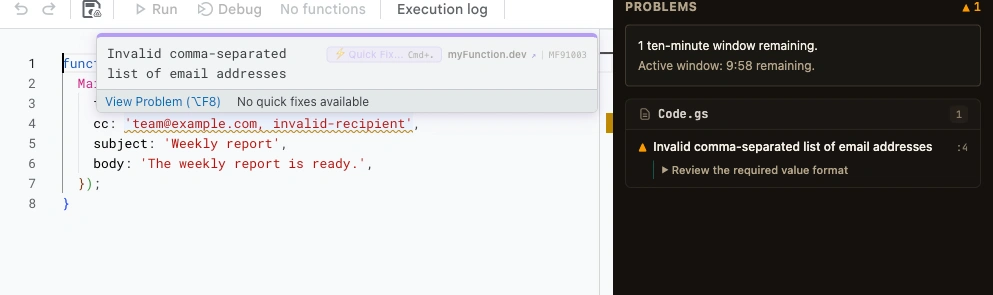
Apps Script declares mail recipients, folder paths, and URLs as generic strings. myFunction checks literal values against the expected format (code 91003) and flags malformed email addresses, including inside comma-separated CC lists.

Captured in Apps Script Domain validation · MF91003
Google Apps Script editor showing a myFunction warning on a MailApp sendEmail cc recipient list containing an invalid entry, with a branded myFunction.dev diagnostic hover
Validate MailApp recipients The warning identifies invalid recipients inside comma-separated lists before code runs.

Cross-file type inference

Give untyped parameters useful types.

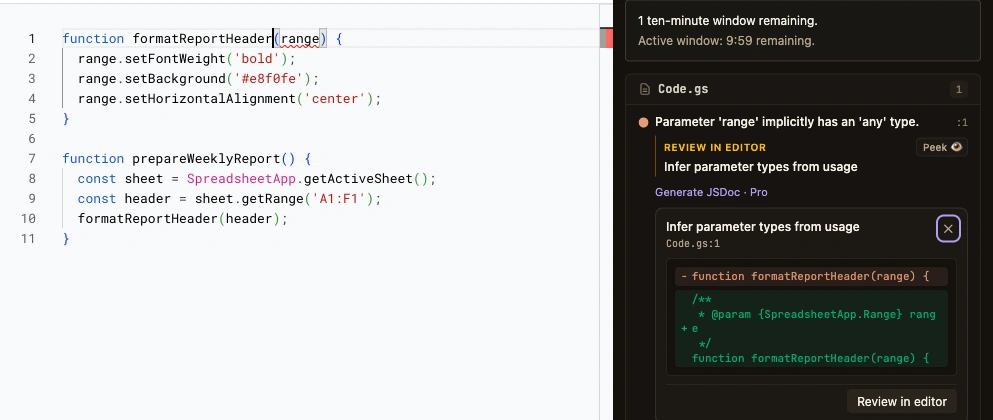
Apps Script functions without JSDoc leave parameters as untyped any. myFunction traces function calls across your project and offers a Quick Fix (TS7006) to infer parameter types from real usage and generate JSDoc annotations.

Captured in Apps Script Quick fix · TS7006
myFunction preview adding a SpreadsheetApp.Range JSDoc type inferred from a function call
Infer parameter types from usage Review the inferred parameter type, then apply the JSDoc annotation from the editor Quick Fix menu.

Limits

What myFunction cannot do.

NO Execute Apps Script functions
myFunction never runs your script. Running stays in the editor, in your hands.
NO Run tests for you
It can propose test code. Deciding to run it and reading the result remain yours.
NO Create versions or deployments
Versions and deployments are untouched. Published behavior changes only when you change it.
NO Apply changes without your choice
Quick fixes modify text in your open editor only when you choose to apply them. There is no auto-save or auto-apply mode.

Questions

Asked and answered.

Does myFunction run my Apps Script functions?
No. Running stays in the Apps Script editor, in your hands. myFunction reports diagnostics and offers quick fixes, but it never executes your script.
Does myFunction modify or save my project automatically?
No. Quick fixes change text in your open editor buffer only when you choose to apply them. myFunction never saves, deploys, or runs your code.
What does the language server add to the Apps Script editor?
Loop-batching checks for quota-heavy service calls, value validation for literal strings, cross-file project diagnostics, hover documentation, signature help, and quick fixes, based on how Apps Script services behave at runtime.

Install for Chrome

Real tooling for Apps Script. Every write still yours.

Autocomplete, hover, and navigation are free. Diagnostics include one 10-minute session without an account and five per month when signed in. myFunction Pro includes unlimited diagnostics at $5.99/month.